


Welcome
- Details
- Written by: admin
- Category: Willkommenstexte
-
Also available:


- Hits: 30455
Welcome on BeSly the Haiku knowledge base.
This site are created to help other users and developers. What to start, has begun in August 2004 with only German translations and little tutorials has now become a comprehensive, informative, multi-lingual knowledge base.
It contains a variety of assistance to install, program descriptions, program and system settings. We always try to make the tutorials easy to understand with a simpe but effect layout. In the years the site is online many ideas are included into the website. Idears from other users, like the system information at the beginning of every tutorial.
The menu structure is designed so that all instructions are displayed sorted by their program type. You can also use the search function to find tutorials.
There is also a small Software that allows you to find BeSly tutorials. Here also all programs listed by there program type, but also by the system type, language or authors. Even the smallest instructions are included, usually found only in collections of "Tips and Tricks".
Due to the similarity between the systems, wich are all have the same basis or be a rebuild, many of the tutorials are applicable on all systems.
Who wants to help this project, can do this writing their own tutorials, descriptions or translations. Also ideas or criticisms are welcome.
With the relaunch of BeSly it is now possible for the user to write the instructions themselves in the web interface. Even uploading pictures should be no problem. The only condition is to log on the BeSly. Your data will not pass from us.
How to set the App Version and Description long text
- Details
- Written by: lorglas
- Category: Development
- Hits: 4414
Sometimes you want to add the Version Info and a description to your program.
In this example you can see that the version and description (Beschreibung) is empty.
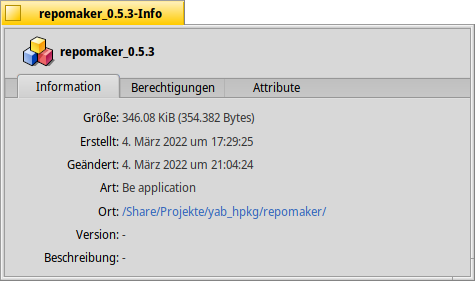
To set this, you can use the command setversion over the terminal. to do that, open the Terminal and type setversion -h and press Enter.
| setversion -h |
After this you get this information.
|
setversion: you did not specify any version Usage: setversion filename |
To set the version and the description you can use the example code below.
Example code:
|
setversion /Share/Projekte/yab_hpkg/repomaker/repomaker_0.4.5 -app 0 0 0 -long "This is a tool to manage your own Repository" |
In this example i define the location of the app. After that, i write the version for major middle minor.
 |
Keep in mind, that between the major middle and minor value is a space, not another character. No Minus or dot or somethink else. |
After the minor string it is possible to set the long version info text with
| -long "This is a tool to manage your own Repository" |
If you set the app version and the long description with the previous example code, you get this result.
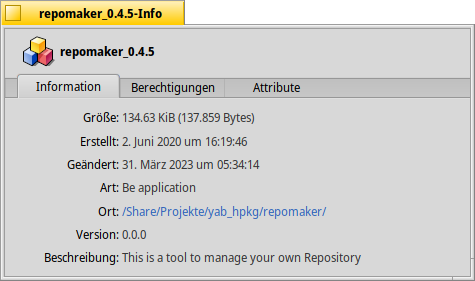
Here are a list of further option, but i didn't test it right now.
| d | development |
| a | alpha |
| b | beta |
| g | gamma |
| gm | goldenmaster |
| f | final |
YAB Namespace / Library
- Details
- Written by: admin
- Category: yab
-
Also available:
- Hits: 110
1. Overview
YAB allows a program to be divided into several external libraries.
A library can contain:
* Variables
* String variables
* Arrays
* Subroutines
* Exported subroutines
A library is included using `import`. Its externally available components are accessed through the library's namespace.
|
import test1 n=test1.test1() |
Here, `test1` is the namespace and `test1()` is the exported subroutine.
2. Libraries and Namespaces
One or more libraries can be imported:
|
import test1
import test2
import test3 |
Each library has its own namespace. This allows variables and subroutines with the same name in different libraries to be distinguished unambiguously.
|
a=test1.value n=test1.test() |
The namespace is placed before the name of the desired component when accessing it:
| namespace.sub$()
namespace.variable |
3. Exported Subroutines and Return Values
A subroutine that is intended to be called from outside its library is defined using `export`:
|
export sub test1() return 10 end sub |
The subroutine is called through the namespace:
| n=test1.test1() |
Subroutines with `$` can also be exported:
|
export sub test2$() return "Hello" end sub |
Call:
| text$=test2.test2$(). |
The `$` is part of the subroutine name and must therefore also be specified when calling the subroutine.
A subroutine whose name contains `$` can also return a numeric value. Therefore, `$` does not necessarily determine the data type of the `return` value.
Example:
|
export sub test$() return 123 end sub n=test.test$() |
Return values can be assigned directly or processed immediately:
|
n=test.get_number() print arraydim(test.get_array()) |
4. Parameter Passing
Exported subroutines can receive one or more parameters.
|
export sub add(zahl) return zahl*2 end sub |
Call:
| n=test.add(10) |
Multiple parameters:
|
export sub add(zahl1,zahl2) return zahl1+zahl2 end sub |
Call:
| n=test.add(10,20) |
The order of the passed values corresponds to the order of the parameters in the subroutine definition.
Different types of values can also be passed:
|
export sub text$(text$,zahl) return text$+str$(zahl) end sub |
Call:
| text$=test.text$("Value: ",10) |
5. Accessing Variables
Variables of a library can be accessed through its namespace.
Numeric variable:
| n=test1.b |
String variable:
| text$=test1.d$ |
General forms:
| namespace.variable namespace.variable$ |
This allows a library to provide data to other parts of the program in addition to its exported subroutines.
6. `local` Variables
A variable declared with `local` belongs to the respective subroutine.
|
counter=100
export sub test() local counter counter=counter+1 return counter end sub |
Two different variables exist here:
| counter |
→ Library variable
and:
| local counter. |
→ local variable of the subroutine.
The following access:
| test.counter |
refers to the library variable, not the local variable.
The local variable is reinitialized each time the subroutine is called again.
Example:
|
export sub test() local counter counter=counter+1 return counter end sub |
Multiple calls produce:
| test() → 1 test() → 1 test() → 1 |
A `local` variable of another subroutine is also independent, even if it has the same name.
|
export sub test1() local counter counter=counter+1 return counter end sub |
|
export sub test2() local counter counter=counter+10 return counter end sub |
The two `counter` variables each belong to their own subroutine.
7. Accessing Other Libraries
A library can access exported subroutines and variables of other libraries.
Example:
|
export sub test5() a=test1.test1() return a end sub |
Variables can also be accessed:
| n=test1.b text$=test2.d$ |
This allows libraries to use both functions and data from one another.
A library can therefore, for example, use:
| a=test1.test1() b=test1.b |
8. Cross-Namespace Calls
Multiple libraries can be combined.
For example:
| main.yab | |-- test1 |-- test2 |-- test5 |
`test5` can use functions and variables from `test1` and `test2`:
|
export sub test5() a=test1.test1() return a end sub |
This allows larger programs to be built from several specialized libraries.
A library can access both subroutines:
| test1.test1() |
and variables:
| test1.b |
of other namespaces.
9. Arrays
Libraries can contain arrays and return arrays through exported subroutines.
Example:
|
dim numbers(3) numbers(1)=10 |
An exported subroutine can return the array:
|
export sub test_numbers() return number end sub |
The return value can be processed directly through the namespace:
| print arraydim(test_array.test_numbers()) print arraysize(test_array.test_numbers(),1) |
The same applies to string arrays:
| print arraydim(test_array.test_id$()) print arraysize(test_array.test_id$(),2) |
Numeric and string arrays can therefore be returned through namespace subroutines and passed directly to array functions without first having to assign them to a variable.
For example:
| arraydim(test_array.test_numbers()) |
First, the namespace subroutine is executed and its array return value is then passed to `arraydim()`.
Likewise:
| arraysize(test_array.test_numbers(),1) |
or:
| arraydim(test_array.test_id$()) arraysize(test_array.test_id$(),2) |
This also makes the namespace suitable for exchanging more complex data structures between libraries.
10. Variables and Subroutines as a Common Namespace
A library provides different components through its namespace.
Example:
| test1 |-- test1() |-- value |-- text$ |-- Array |
These can all be accessed through the same namespace:
| n=test1.test1() n=test1.value text$=test1.text$ print arraydim(test1.get_array()) |
The namespace therefore serves as a common namespace for the subroutines and variables provided by the library.
11. Confirmed Features
The namespace functionality was tested using a test series consisting of a total of 16 tests.
 |
**The following areas were tested:** * Importing multiple libraries |
In particular, it was confirmed that an array return value can be processed directly:
| arraydim(test_array.test_numbers()) arraysize(test_array.test_numbers(),1) arraydim(test_array.test_id$()) arraysize(test_array.test_id$(),2) |
12. Quick Reference
| **Function** | **Syntax** |
| Import library | `import name` |
| Export subroutine | `export sub name()` |
| Export `$` subroutine | `export sub name$()` |
| Call subroutine | `name.sub()` |
| Call `$` subroutine | `name.sub$()` |
| Variable | `name.variable` |
| String variable | `name.variable$` |
| One parameter | `name.sub(value)` |
| Multiple parameters | `name.sub(value1,value2)` |
| Return value | `return value` |
| Return array | `return array` |
| Array dimension | `arraydim(name.sub())` |
| Array size | `arraysize(name.sub(),dimension)` |
| Library variable | `name.variable` |
| Library string variable | `name.variable$` |
13. Summary
 |
**`import`** includes a library,**`export`** makes a subroutine available externally, and the namespace provides unambiguous access to the variables and subroutines of the library. |
|
import meine_lib n=meine_lib.berechnen(10) wert=meine_lib.variable print arraydim(meine_lib.get_array()) |
This allows YAB programs to be divided into multiple libraries and these libraries to communicate with one another through namespaces.